
v3 Migration Guide
Blue Button API Version 3 (v3) overview
In the Blue Button API Version 3 (v3), the following improvements have been made:
- Improved claims data timeliness
- Availability of partially adjudicated claims
- Additional Part D information
- Improved FHIR conformance to C4BB 2.1.0
- Addition of StructureDefinition and CodeSystem resources
- Verified FHIRPath for each data element
New data source in v3
v1/v2: CCW
In v1/v2, BFD leveraged the Chronic Conditions Warehouse (CCW).
v3: IDR
v3 leverages CMS’s Integrated Data Repository (IDR) as the primary upstream data source, replacing CCW.
Transition timeline
We will continue to support v1/v2 while users transition to v3. We encourage all users to roadmap their transition to v3; our timelines for deprecation and sunset of v1 and v2 are as follows:
| Version | Removed from active maintenance | Sunset |
|---|---|---|
| Blue Button v1 | June 30, 2026 | July 30, 2027 |
| Blue Button v2 | June 30, 2026 | July 30, 2027 |
Migrating from Blue Button v1/v2 to v3
If you are a Blue Button API user with an application that uses v1 or v2 of the API, this document will help you understand the changes coming your way.
Changes coming in v3
There are changes coming in v3, many of which were developed with input from Blue Button users.
1. Endpoint structure
As an application developer, the endpoints you use will remain consistent. The Blue Button v1/v2 endpoint structure is
/v2/fhir/Patient/v2/fhir/Coverage/v2/fhir/ExplanationOfBenefit/v2/fhir/metadata/v2/connect/userinfo
The v3 endpoint structure is unchanged. That is, all v2 endpoints have a v3 analog:
/v3/fhir/Patient/v3/fhir/Coverage/v3/fhir/ExplanationOfBenefit/v3/fhir/metadata/v3/connect/userinfo- NEW:
/v3/fhir/Patient/{patient}/$generate-insurance-card
In terms of structure, under v3, Blue Button adds a new endpoint that provides a CARIN for Digital Insurance Card (C4DIC) bundle, described later in this document under CARIN for Digital Insurance Card (C4DIC) data endpoint. Note that the shape of the data returned from v3 endpoints changes in several critical ways, so even if the URLs look familiar, developers will need to address the differences in the shape of the FHIR data that is returned under v3.
2. Token Usage Across v1/v2 and v3
v1/v2 tokens compatible with v3
Valid v1 and v2 tokens will continue to work when requesting v3 data, as long as the token’s scopes match the data being requested. You do not need to generate new tokens solely for the purpose of accessing v3 endpoints.
Existing tokens revoked when an enrollee completes a new authorization flow
If an enrollee completes a new Blue Button authorization flow while a valid token already exists for your application, the previous token will be automatically revoked upon successful authorization.
Examples of when this applies:
- An enrollee who previously completed the v2 auth flow completes the v3 auth flow
- An enrollee repeats the same auth flow (e.g., v3 to v3)
Why this change was made: An enrollee’s data sharing preferences may change between authorization flows. For example, a user may grant broader permissions in v2 but restrict certain data in v3. Revoking the older token ensures your application always reflects the enrollee’s most recent preferences.
What this means for your app: If your application stores tokens, you should expect that a previously issued token may become invalid after a user re-authorizes. Handle token revocation errors gracefully and prompt re-authorization when needed.
v2 Explanation of Benefits (EOB) requests are blocked for v3 tokens that suppress substance use data
Any v3 token where the enrollee has opted out of sharing substance use data cannot be used to retrieve Explanation of Benefits (EOB) data via the v2 endpoint. Attempting to do so will return an error.
Why this change was made: The v2 endpoint does not support substance use data suppression. To honor the enrollee’s most recent privacy preferences, BBAPI blocks EOB retrieval entirely in v2 when a v3 token has substance use data sharing disabled.
What this means for your app: If your application uses v2 EOB endpoints with tokens obtained through the v3 auth flow, check whether the enrollee has opted out of substance use data sharing. If they have, EOB requests on v2 will fail. We recommend migrating EOB data retrieval to the v3 endpoint to fully support enrollee preferences.
3. FHIR IDs in v2 and v3
FHIR IDs for Patient resources will differ between v2 and v3. In v2, the FHIR ID was a construct of the CMS Chronic Conditions Warehouse (CCW), the upstream data provider for v2. In v3, data is sourced from the Integrated Data Repository (IDR). Review the New Patient Management section for additional details.
If your resource requests use the Patient id value, either in the path or as a query parameter, make sure you:
- Issue a token refresh using the v3 token endpoint (/v3/o/token/)
- Grab the patient ID from the Patient resource’s
idfield in the token response - Use that ID for all subsequent v3 resource requests
Otherwise, you will get errors and be unable to pull data for the user.
4. Scopes and how beneficiaries grant permissions
In v2, we did not require apps to send scopes on authorize requests. When no scope parameter was provided, we would provide a default set of scopes on the resulting access token.
In v3, scopes are now required on the auth request. If they are not requested, then an error will be returned.
In v3, there are changes to the permission screen, which allows enrollees more granular control of what is being shared.
v3 introduces a dynamic permission screen that represents a significant departure from the current experience. Today, all enrollees see the same static permission screen regardless of what data an app actually needs. With v3, the permission screen will only display the specific FHIR resources the app has explicitly requested via scopes, which may include Patient, Coverage, and/or ExplanationOfBenefit data. This means enrollees are only asked to consent to what is strictly necessary.
The permission screen text has also been updated to be more user-friendly, and enrollees can expand each section to learn more about the specific data being shared before granting consent.
If a user does not click “Share,” then the information will not be shared with the application.
Additionally, in v3, patients can opt in to share substance use information for applications requesting ExplanationOfBenefit FHIR resources. The default, however, will be set to not share.
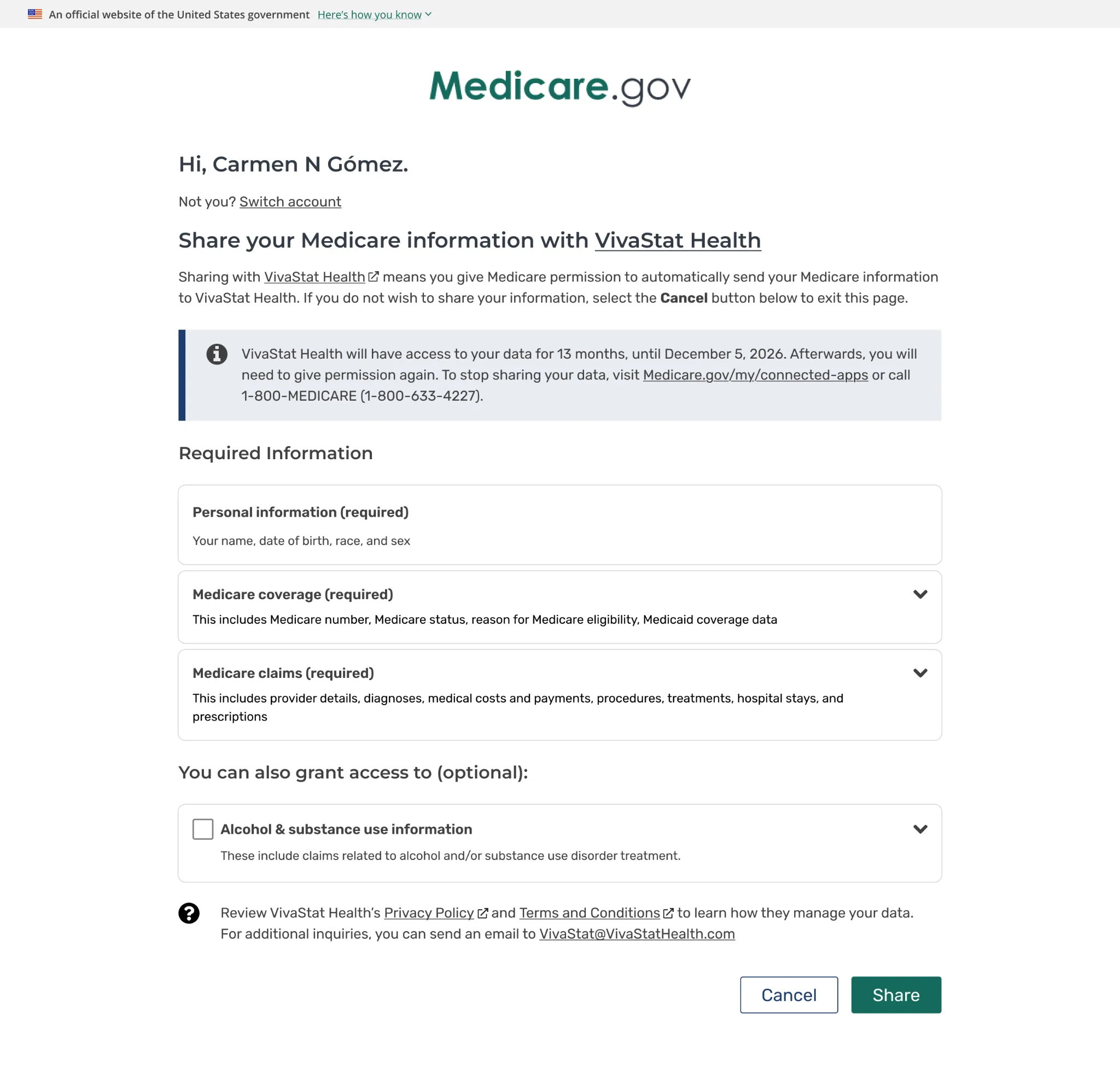
The permission screen above reflects an application that is requesting Patient, Coverage, ExplanationOfBenefit FHIR resources.
5. CARIN for Digital Insurance Card (C4DIC) data endpoint
In v3, a new endpoint, /v3/fhir/Patient/{patient}/$generate-insurance-card, will be available. This will allow developers to surface digital proof of Medicare coverage to enrollees, providing details on the types of coverage available.
This endpoint references the CARIN Digital Insurance Card Implementation Guide. It returns a bundle that includes patient and coverage resources conformant to the Digital Insurance Guide profile. An example of this may be found in the Blue Button Swagger resource
6. New pagination parameter for v3 ExplanationOfBenefit
For v3 ExplanationOfBenefit search calls, the offset parameter will be used to paginate through an enrollee’s claims data, rather than the startIndex parameter.
In v3 ExplanationOfBenefit search calls, 10 records are returned by default. You can return more than 10 by passing in a count parameter (the value must be between 1 and 50). So, if an enrollee has 20 claims in v3, you could retrieve the first 10 without passing any parameters, and you could then retrieve the remaining 10 by passing offset=10. If you want all the claims data you can get in a single call, pass count=50. Further details are available in the Blue Button Swagger resource.
v3 Resources
v3 Data Dictionary
The Data Dictionary is the authoritative source for mappings between the IDR and the FHIR representations of Blue Button v3.
The Data Dictionary also contains mappings from the CCW column (from the Blue Button API v1/v2 Data Dictionary) to the FHIR element in v3.
v3 synthetic data
In Blue Button API v2, synthetic data was generated using Synthea to approximate the mathematical and statistical properties of real data.
In v3, synthetic data represents how individual fields may be populated. It does not necessarily reflect an individual’s longitudinal progression through life. Future plans include generating synthetic data using Synthea.
If you find issues with the synthetic data in v3, please reach out to bluebuttonapi@cms.hhs.gov. We want your feedback!
Extracting Data Elements from BFD data
Blue Button recommends using FHIRPath expressions to extract discrete data elements. FHIRPath expressions are populated in the Data Dictionary. FHIRPath is a specification that provides path-based navigation and is uniquely suited to consistently recommend the isolation of specific elements with minimal code.
Review the specification at the HL7 FHIRPath release.
To resolve references to contained resources, make sure your FHIRPath implementation is context-aware. The Data Dictionary itself populates examples using fhirpath.js, but additional implementations are listed at the FHIRpath implementations page on Confluence. FHIRPath expressions can be conveniently used to create ViewDefinitions for use with SQL on FHIR (https://build.fhir.org/ig/FHIR/sql-on-fhir-v2/).
Details of Major Updates in v3
I. Data ingestion frequency in v3
In v1/v2, there can be several months’ delay between the creation of an enrollee’s information and when Blue Button’s upstream data provider, the Beneficiary FHIR Data (BFD) server, receives it. In v3, we eliminated this lag time. An enrollee’s information is now often available several months before Medicare coverage starts.
The following table shows the update frequency for data ingested across versions.
| Resource | v1/v2 | v3 |
|---|---|---|
| Patient | Weekly, on Friday | 6 times a week, Sunday to Friday |
| Coverage | Weekly, on Friday | 6 times a week, Sunday to Friday |
| ExplanationOfBenefit - Part A/B (Adjudicated) | Weekly, on Friday | Weekly, on Tuesday. |
| ExplanationOfBenefit - Part D | Weekly, on Friday | 5 times a week, Sunday to Thursday |
| ExplanationOfBenefit - Part A/B (Shared Systems) | N/A | 4 times a week, Sunday and Tuesday to Thursday |
II. Field mappings and data element changes
Changes include the element name, description, FHIRPath expressions, and other information, such as which Code Systems are applicable (for CMS-specific terminology). View the Data Dictionary to explore changes to individual data elements.
Changes to Resource Types
Patient resource
- Conformance to C4BB 2.1.0
- Dual eligibility status extensions have been removed and are now available through the Coverage resource
- “Member Number” now refers to an individual’s MBI
- Patient merge implemented - See dedicated section below
Coverage resource
- All extensions replaced with FHIR-conformant extensions + proper CodeSystems
- Now conform to C4BB 2.1.0 and US Core 6.1.0.
- Rx elements from Part D plans are included in the Part D Coverage resource
- Additional Coverage resource for Dual Medicare-Medicaid eligibility status
- Reference year + reference month concepts deprecated in favor of start and end dates for individual Coverage resources
- Last Updated times are shared between Parts A + B and C + D. If it is important to determine which coverage changed, we recommend parsing the resource as if it were signed using static canonicalization
ExplanationOfBenefit resource
- All extensions replaced with FHIR-conformant extensions + proper code systems
- Claims are mapped to conform to C4BB 2.1.0
- DME claims now correctly use the Professional profile
- Notice of hospice election is available in BFD v3, with claim types 1900 and 2900. These claims do not receive an adjudicated version, but are almost always followed up with a submitted hospice claim several weeks after the notice of election is available
- A new metadata field,
source, has been added to identify the CMS system from which the information originated:NCH= National Claims History (All adjudicated claims for Parts A + B)FISS= Fiscal Intermediary Shared System (Partially Adjudicated Institutional Claims)MCS= Multi-Carrier System (Partially Adjudicated Professional Claims)VMS= Viable Information Processing Systems (ViPS) Medicare Shared System (Partially Adjudicated DME claims)DDPS= Drug Data Processing System (All Part D claims)MAP= Medicare Adjudication Portal (some professional claims)
- A new metadata field,
tag, groups A+B claims from FISS, MCS, VMS into a single tag, SharedSystem - Includes metadata security labels. Our upstream data provider will return the security tag
42CFRPart2if an item is determined to be sensitive under an inter-agency agreement with SAMHSA. Partially and fully adjudicated data will have tags to that effect - Consolidation of adjudication-related information to
ExplanationOfBenefit.item.adjudicationandExplanationOfBenefit.adjudication - Addition of claim control numbers to track prior versions of a claim
ExplanationOfBenefit.createdis the effective date of the claim version, as recorded in the claim source (in v2, this field was the day the request to BFD was made)ExplanationOfBenefit.meta.lastUpdatedcontinues to represent the time the EOB was last updated in BFD. Three new EOB profile search parameters
The earliest lastUpdated value is from March 2026, when the data was initially loaded into BFD.
III. Metadata filtering
v3 exposes three search parameters to allow for filtering on the basis of metadata.
_source
Filtering by _source filters on the Meta.source key. Both AND and OR operations are supported. (Filtering by AND is useless, however, since its outcome would yield no results matching.)
The sources to filter on, and their constituent data, are below.
| Meta.source | Data Explanation |
|---|---|
| NCH | National Claims History (All claims for Parts A + B) |
| FISS | Institutional claims from Shared Systems |
| MCS | Carrier claims from Shared Systems |
| VMS | DME claims from Shared Systems |
| DDPS | Part D Data from DDPS |
| MAP (Not yet implemented) | [some] Carrier claims from Shared Systems. |
| CWF (Not yet implemented) | Prior Authorization data |
_tag
v3 currently supports two tags, System-Type and Final-Action, which need to be sent in token format (e.g., system|code). Both AND and OR are supported.
| tag | What’s returned? |
|---|---|
https://bluebutton.cms.gov/fhir/CodeSystem/System-Type|SharedSystem | A + B claims from the Shared Systems (FISS,MCS,VMS,MAP,CWF) |
https://bluebutton.cms.gov/fhir/CodeSystem/System-Type|NationalClaimsHistory | A + B claims from the National Claims History |
https://bluebutton.cms.gov/fhir/CodeSystem/System-Type|DDPS | Part D claims |
https://bluebutton.cms.gov/fhir/CodeSystem/Final-Action|FinalAction | Claims that are marked Final Action. (Note: While this tag exists, it is not recommended for filtering claims by processing status) |
https://bluebutton.cms.gov/fhir/CodeSystem/Final-Action|NotFinalAction | Claims that are not marked Final Action. (Note: While this tag exists, it is not recommended for filtering claims by processing status) |
_security
_security allows for targeting of SAMHSA-related data. v3 populates a Meta.security token on data that is “sensitive” on the basis of the ACO-OS sensitive data list.
| _security query | What this matches | What this excludes |
|---|---|---|
_security:not=42CFRPart2 | All claims with a Meta.security element of anything other than 42CFRPart2 | All 42CFRPart2 claims |
_security=42CFRPart2 | All claims with a Meta.security element of 42CFRPart2 | All other claims |
The default behavior is based on the API team certificate.
- BlueButton - Yes
IV. EOB Profile Support in BFD v3
v3’s Explanation of Benefits (EOB) resources include several elements, many of which are CMS-specific and may not be needed by all consumers. To reduce payload size and improve interoperability, v3 will support three distinct EOB profiles, allowing API consumers to request only the data they need.
| _profile | What’s included? | Financial data included? |
|---|---|---|
| CMS Blue Button Profile (default) | All data elements. This is the current default behavior. If no profile parameter is provided, the full profile will be returned. | Yes |
| C4BB Full Profile (filtered) | Returns the full US Realm “core data set” for claims as defined by the C4BB profiles. | Yes |
| Basis Profile (filtered) | Returns only fields profiled in the C4BB Basis Profiles. | No |
Profiles are represented in the ExplanationOfBenefit’s meta.profile element.
For those with the “CMS Blue Button” profile, meta.profile will contain both the C4BB url (versioned) + a bluebutton.cms.gov profile. Actual profiles for CMS Blue Button will be published later this summer.
Example: Meta.profiles for a Pharmacy EOB
| Profile | Meta.profile |
|---|---|
| Basis | https://hl7.org/fhir/us/carin-bb/StructureDefinition/C4BB-ExplanationOfBenefit-Pharmacy-Basis|2.2.0 |
| Regular | https://hl7.org/fhir/us/carin-bb/StructureDefinition/C4BB-ExplanationOfBenefit-Pharmacy|2.2.0 |
| CMS | https://hl7.org/fhir/us/carin-bb/StructureDefinition/C4BB-ExplanationOfBenefit-Pharmacy|2.2.0, https://bluebutton.cms.gov/fhir/StructureDefinition/CMS-ExplanationOfBenefit-Pharmacy |
Syntax for profile filtering
Filtering for profiles is done using the profile parameter. If no profile parameter is passed, the CMS profile will be returned. While AND and OR syntaxes are supported, using AND provides no value and is not advised.
The profiles will not require canonicals (e.g., versions), but they may be passed. BFD recommends that documentation encourage the default behavior over specifying the CMS profile.
| Profile | Basis | Regular | CMS Profile |
|---|---|---|---|
| Pharmacy | https://hl7.org/fhir/us/carin-bb/StructureDefinition/C4BB-ExplanationOfBenefit-Pharmacy-Basis](https://hl7.org/fhir/us/carin-bb/StructureDefinition/C4BB-ExplanationOfBenefit-Pharmacy-Basis|2.1.0) | [https://hl7.org/fhir/us/carin-bb/StructureDefinition/**C4BB**\-ExplanationOfBenefit-Pharmacy](https://hl7.org/fhir/us/carin-bb/StructureDefinition/C4BB-ExplanationOfBenefit-Pharmacy|2.1.0) | [https://bluebutton.cms.gov/fhir/StructureDefinition/**CMS**\-ExplanationOfBenefit-Pharmacy](https://bluebutton.cms.gov/fhir/StructureDefinition/Pharmacy-Maximus) |
| Professional | [https://hl7.org/fhir/us/carin-bb/StructureDefinition/**C4BB**\-ExplanationOfBenefit-Professional-NonClinician-**Basis**](https://hl7.org/fhir/us/carin-bb/StructureDefinition/C4BB-ExplanationOfBenefit-Professional-NonClinician-Basis|2.1.0) | [https://hl7.org/fhir/us/carin-bb/StructureDefinition/**C4BB**\-ExplanationOfBenefit-Professional-NonClinician](https://hl7.org/fhir/us/carin-bb/StructureDefinition/C4BB-ExplanationOfBenefit-Professional-NonClinician|2.1.0) | [https://bluebutton.cms.gov/fhir/StructureDefinition/**CMS**\-ExplanationOfBenefit-Professional-NonClinician](https://bluebutton.cms.gov/fhir/StructureDefinition/Professional-Maximus) |
| Institutional Inpatient | [https://hl7.org/fhir/us/carin-bb/StructureDefinition/**C4BB**\-ExplanationOfBenefit-Inpatient-Institutional-**Basis**](https://hl7.org/fhir/us/carin-bb/StructureDefinition/C4BB-ExplanationOfBenefit-Inpatient-Institutional-Basis) | [https://hl7.org/fhir/us/carin-bb/StructureDefinition/**C4BB**\-ExplanationOfBenefit-Inpatient-Institutional](https://hl7.org/fhir/us/carin-bb/StructureDefinition/C4BB-ExplanationOfBenefit-Inpatient-Institutional|2.2.0) | [https://bluebutton.cms.gov/fhir/StructureDefinition/**CMS**\-ExplanationOfBenefit-Institutional-Inpatient](https://bluebutton.cms.gov/fhir/StructureDefinition/Inpatient-Maximus) |
| Institutional Outpatient | [https://hl7.org/fhir/us/carin-bb/StructureDefinition/**C4BB**\-ExplanationOfBenefit-Outpatient-Institutional-**Basis**](https://hl7.org/fhir/us/carin-bb/StructureDefinition/C4BB-ExplanationOfBenefit-Outpatient-Institutional-Basis) | [https://hl7.org/fhir/us/carin-bb/StructureDefinition/**C4BB**\-ExplanationOfBenefit-Outpatient-Institutional](https://hl7.org/fhir/us/carin-bb/StructureDefinition/C4BB-ExplanationOfBenefit-Outpatient-Institutional-Basis) | [https://bluebutton.cms.gov/fhir/StructureDefinition/**CMS**\-ExplanationOfBenefit-Institutional-Outpatient](https://bluebutton.cms.gov/fhir/StructureDefinition/Institutional-Outpatient-Maximus) |
OR syntax in FHIR uses commas. To query for just CMS institutional inpatient profiled-resources + pharmacy basis profiled resources, one would use the following example query:
GET ExplanationOfBenefit?profile=https://bluebutton.cms.gov/fhir/StructureDefinition/CMS-ExplanationOfBenefit-Institutional-InpatientV. Widespread availability of partially adjudicated claims (PAC) data
v3 enables greater availability of non-Final Action claim elements and greater interoperability with adjudicated claims than in v2. They are represented using the ExplanationOfBenefit resource and are profiled to the CARIN Blue Button 2.1.0 profiles. Partially adjudicated claims data is located in the Shared Systems database. More information about how to query this data is below.
Disclaimers for non-Final Action claims:
- Claims with outcome = partial may contain nonsensical values in coded elements, such as invalid CPT/HCPCS codes and invalid diagnosis codes, due to their non-finalized nature. This is more likely in claims with a claim type code of 1XXX. ExplanationOfBenefit.outcome can be used to determine the processing stage of a claim.
- Not all fields are available in non-Final Action claims. Most of these relate to benefit balance information that isn’t available until a claim has been fully adjudicated. There is ongoing work to improve parity between data from the Shared Systems and the National Claims History.
How to use Shared Systems data
Without any filters applied, v3 will return Part A and Part B data from the National Claims History (NCH), as well as Part D data, by default.
To access the Shared Systems data, use the source or the tag parameters as described below to specify the data you’d like to retrieve.
The metadata filters described in the Metadata Filtering section can be used to change this behavior, set API-specific defaults, etc.
Filtering Part A / B data using source and tag
Filtering data by a claim’s source system is possible using either the source or tag parameters.
| source | Data retrieved |
|---|---|
NCH | Claims for Part A + B from the National Claims History |
VMS | Claims for Part B from VMS |
FISS | Claims for Part A + B from FISS |
MCS | Claims for Part B from MCS |
MAP | Claims for Part B (for now) from MAP |
DDPS | Part D claims from DDPS |
vs.
| tag (don’t forget system!) | Data retrieved |
|---|---|
NationalClaimsHistory | Claims for Part A + B from the National Claims History |
SharedSystem | Claims for Part A + B from VMS, FISS, MCS, and MAP |
DDPS | Part D claims from DDPS. |
VI. New patient ID management
There are two major updates to patient ID management in v3 that address many issues present in v2.
- New patient merge feature
- Removal of CCW-specific identifiers, such as BENE_ID
Issues in v2 solved in v3
- Duplicative records for a single patient
- Some patients had >1 BENE_ID
- This field was generated by CCW in v1/v2 as a unique patient identifier. However, in some edge cases, it was not always unique.
- Some patients had >1 MBI
- Data not inserted until 5+ months after entitlement in some instances
As a result of these technical problems, users reported that claims and patients that appeared in other data sources were “missing” in the DASG APIs. Users may also have received an excess of “Beneficiary not found” responses or were unable to compare to opt-out information.
New in v3: Patient merge
In v3, there has been a largely reconciled/merge of patients who had duplicative records under more than one identifier. Patient merge is the back-end operation applied by the v3 upstream data provider, in which duplicate patients are “grouped”. Now, v3 will always direct to a single active patient record.
To see which records have been merged, users can refer to the Patient.link element. This also describes whether a record “replaces” another or was “replaced-by” another.
Possible ID-based searches in v3:
| Search on past or present MBI | Resource returned contains: The most up-to-date data All MBIs (past + present) Links to other merged MBIs under Patient.link “Replaces” or “replaced by” |
|---|---|
Query using BENE_ID | No data returned. This field is deprecated in v3. |
Example of a patient merge
Below is an example of a Patient.link element of a surviving Patient resource. This illustrates how the current Patient resource replaces Patient/234567891
"link": [ { "other": { "reference": "Patient/234567891", "display": "234567891" }, "type": "replaces" }]On Patient/234567891, the following link would be present, indicating it was replaced by Patient/12345.
"link": [ { "other": { "reference": "Patient/12345", "display": "12345" }, "type": "replaced-by" }]VII. Improved FHIR conformance
v3 resources conform with CARIN for Blue Button version 2.1.0, which itself builds upon US Core 6.1.0. BFD v3 supports FHIR R4.
Extension/Terminology changes to CodeSystem/StructureDefinition resources
v3 retires the usage of /resources to represent extensions and CodeSystems. Instead, these are properly represented in v3 using StructureDefinition and CodeSystem resources.
Example
| v1/v2 | v3 |
|---|---|
| The “Near Line Record Identification Code” uses an extension at /resources/variables/nch_near_line_rec_ident_cd/. This address references a code system with the same URL. | The extension has the URL https://bluebutton.cms.gov/fhir/StructureDefinition/CLM-NRLN-RIC-CD, is represented as a StructureDefinition, and references the FHIR CodeSystem resource https://bluebutton.cms.gov/fhir/CodeSystem/CLM-NRLN-RIC-CD. |
In the Data Dictionary, fields populated by a CMS code system have a link to the CodeSystem URL in the referenceTable column. FHIRPath expressions for extracting these fields also reference the extension URLs to target the extraction of individual resources.
VIII. Accessing Partially Adjudicated Claims via Shared Systems
Blue Button v3 gives applications access to claims data from CMS’s Shared Systems (FISS for institutional claims, MCS for professional claims, and VMS for DME claims) well before a claim finishes adjudication. Where fully adjudicated Part A/B data can take weeks to appear, Shared Systems data is typically available within days of a provider submitting a claim.
What this enables for your application:
- Near real-time visibility into an enrollee’s care. For example, surfacing a hospital discharge within days rather than weeks.
- Earlier detection of care events that may need follow-up (e.g., a procedure or ER visit that hasn’t yet been fully processed).
- The ability to build dashboards or alerts driven by claim submission rather than final adjudication.
How it works
- A provider submits a claim to Medicare.
- The claim is picked up by the relevant Shared System (FISS, MCS, or VMS) and becomes available in Blue Button v3, tagged SharedSystem, with outcome=partial or outcome=complete depending on processing status.
- As the claim is adjusted or finalized, the Shared Systems record updates in place — your application should expect to see the same claim change over time (see Claim Control Numbers, Section XI, for how to track this).
- Once the claim is fully adjudicated, it also appears in the National Claims History (NCH) source, tagged NationalClaimsHistory.
IX. Claim Adjudication using “Outcome”, and “Final Action”
Outcome
v3 exposes all claims as ExplanationOfBenefit resources. The processing status of claims is enumerated in ExplanationOfBenefit.outcome.
The values for outcome are:
| Code | Meaning | Notes |
|---|---|---|
| complete | Processing complete | “Adjudicated” |
| partial | Partially-processed | “Partially-Adjudicated” |
| queued | Received but not yet processed | Very rare to encounter |
| error | An error in processing occurred | This status is mapped but should never show up in practice. |
Outcome values by source:
| Source System | Source Field & Logic | ExplanationOfBenefit.outcome |
|---|---|---|
| NCH | All records | complete |
| DDPS | All records | complete |
| Shared Systems | CLMPDSTUSCD IN ( P, 1, R, 2, D, Y) | complete |
| Shared Systems | CLMPDSTUSCD IN (’~‘,I,S, T) | partial |
v3 exposes a search parameter on the outcome element.
Syntax (using OR):
/ExplanationOfBenefit?outcome=complete,partial
Syntax (just one):
/ExplanationOfBenefit?outcome=complete
These can be combined with other search parameters.
Final Action
In the IDR, Final Action is “A VALUE INDICATING A FINAL ACTION CLAIM. VALID VALUES: Y = FINAL ACTION CLAIM, NOT VOIDED. N = NOT FINAL ACTION CLAIM.”
X. Deduplicating claims and identifying duplicates
v3 returns only the most recent version of a claim
In v2, when users call up a specific patient’s data, they will see all past claims – potentially dozens. In v3, the system automatically handles claims deduplication from the same source. It will only surface the latest version of a claim as indicated by its upstream source. The system does not de-duplicate between sources of claims information.
This means that there are two possible scenarios:
| Scenario | API behavior | Tags (tag) | Source (source) |
|---|---|---|---|
| A user calls up a claim that is still being adjudicated. The claim is volatile and updates often. | 1 EOB is returned | SharedSystem | FISS/MCS/VMS |
| A user calls up an adjudicated claim. The claim has been processed and finalized. | 2 EOB resources are returned One from Shared Systems One from the National Claims History | 1 claim with tag= SharedSystem 1 claim with tag= NationalClaimsHistory | 1 claim from FISS/MCS/VMS 1 claim from NCH |
Claim Control Numbers in v3
In CMS claims-processing systems, all institutional and professional claims are assigned a Claim Control Number. This is represented in three fields in the IDR:
CLM.CLMCNTLNUMCLM.CLMORIGCNTLNUMCLM.CLMPRNTCNTLNUM
The claim control numbers uniquely identify a claim based on CLMCNTLNUM, BENESK, and CLMFROMDT. This information can be used to deduplicate across different versions of the same claim within the same source + across claims from the Shared Systems + NCH.
The claim control number can be extracted by executing the FHIRPath expression:
ExplanationOfBenefit.identifier.where('system'='https://bluebutton.cms.gov/fhir/CodeSystem/CLM-CNTL-NUM').valueThe original claim control number (if available) can be extracted by executing the FHIRPath expression:
ExplanationOfBenefit.related.where(relationship.coding.system = 'https://terminology.hl7.org/CodeSystem/ex-relatedclaimrelationship').reference.where(system='https://bluebutton.cms.gov/identifiers/CLM-CNTL-NUM').valueHow to deduplicate claims with CLM-CNTL-NUM
To identify duplicates using the claim control number, you can identify all claims for a given enrollee with the same ExplanationOfBenefit.billablePeriod.start that share the same CLM-CNTL-NUM (in either identifier or related). The latest version of the claim is currently accessible via BFD.
There may be some instances in which a claim can’t be deduplicated via the CLM-CNTL-NUM. This happens infrequently, most often when a claim is submitted incorrectly or goes through a significant number of revisions. Additionally, there are slight differences in how the various CMS systems track claim control numbers.
Professional claims
Professional claims should be deduplicated by the CLM-CNTL-NUM on a per-enrollee basis. One difference between professional claims from MCS and NCH is that NCH claims will never populate a new claim control number; they will have the original control number. Updated MCS claims with a new control number will populate both the new + parent control number.
Part D claims
Part D claims are submitted to CMS by the Part D plan sponsors (both PDPs + MA). As a result, not all Part D claims have a claim control number, but those that do can be deduplicated using it. ExplanationOfBenefit.related will be populated with the claim’s original control number, if different than the current control number.
Institutional claims
Institutional claims can be deduplicated by using the claim control number on a per-enrollee basis. This is distinct from institutional claim ‘grouping’.
To avoid duplicates, any Shared Systems claims with a 1XXX claim type code that have not received updates for 60 days will be deleted from v3. This is most common with institutional claims. It can generally be inferred by a significant number of fields that two resources are identical in everything except payment and CLM-CNTL-NUM.
FISS and NCH have slightly different logic for CLM-CNTL-NUMs. The EoB.related claim control number on an institutional claim will always be the original claim control number. However, in NCH, if an institutional claim receives multiple rounds of claim control numbers, only the parent will be populated in EoB.related.
DME-specific notes
When VMS processes a claim and releases it to the NCH, the leading digit (a 1) is dropped from the CLM-CNTL-NUM due to a design decision made in preparation for Y2K.
Example:
| VMS Claim Control Number | NCH Claim Control Number |
|---|---|
| 1222222222222222 | 222222222222222 |
XI. Data for Medicare Advantage enrollees
v2 limitations in Medicare Advantage enrollee data
Like v2, v3 surfaces claims for enrollees covered by a Medicare Advantage (Part C) plan. Certain claims are limited in v2. For
- Medicare Advantage enrollees in research studies and
- Those in a 30-month transition period for End-Stage Renal Disease (ESRD),
claims are generally limited to certain SNF claims, hospice claims, and professional/carrier claims.
v3 additions to available data
v3 makes information-only inpatient data available to organizations. If an enrollee enrolled in a Medicare Advantage plan has an inpatient stay at a facility using the Inpatient Prospective Payment System (IPPS), the facility will submit claims to:
- The Medicare Advantage plan
- As a copy to the Medicare Administrative Contractor (MAC) marked as “no bill”
These claims have a CLM_RLT_COND_CD value of 04 (indicating information only). They generally have claim type codes of 61, 62, 63, or 64, but also appear for hospice and SNF claims